



Troubleshooting AWS Transform Collector WinRM
During the addition of discovery for windows servers youmight find that WinRM is failing to connect via HTTPS.
you might see errors in teh collector console for these windows devices like
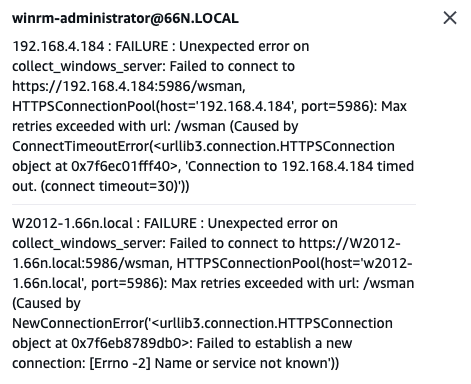
W2012-1.66n.local : FAILURE : Unexpected error on collect_windows_server: Failed to connect to https://W2012-1.66n.local:5986/wsman, HTTPSConnectionPool(host=’w2012-1.66n.local’, port=5986): Max retries exceeded with url: /wsman (Caused by NewConnectionError(‘<urllib3.connection.HTTPSConnection object at 0x7f6eb8789db0>: Failed to establish a new connection: [Errno -2] Name or service not known’))
Temporary WorkAround (powershell script)
# 1. Create self-signed certificate
$cert = New-SelfSignedCertificate -DnsName “W2012-1.66n.local” -CertStoreLocation “cert:\LocalMachine\My”
# 2. Create HTTPS listener
winrm create winrm/config/Listener?Address=*+Transport=HTTPS “@{Hostname=`”W2012-1.66n.local`”;CertificateThumbprint=`”$($cert.Thumbprint)`”}”
# 3. Configure Firewall
New-NetFirewallRule -DisplayName “WinRM HTTPS” -Direction Inbound -Protocol TCP -LocalPort 5986 -Action Allow
Resolution
Check the WinRM Configuraiton on your Windows devices is configured correctly – check out
https://docs.aws.amazon.com/transform/latest/userguide/discovery-tool-setup.html
